

BCA mobile Tutorial
Online Transaction #DibikinSimpel with Debit BCA Mastercard
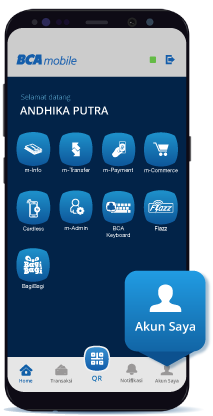
Step 1/10
First activate Debit Online Feature by login at BCA mobile the select “My Account”
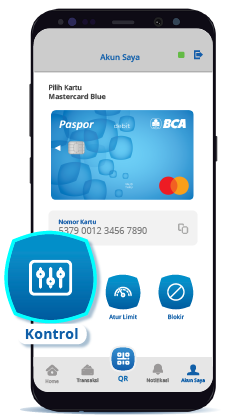
Step 2/10
Select “Control”
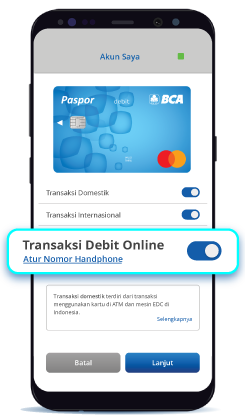
Step 3/10
Activate the online debit transaction feature by swipe right the button
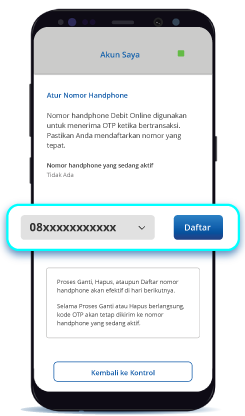
Step 4/10
Set mobile number and select the mobile phone number as the OTP code recipient*
*Make sure to choose the phone number that connects with BCA mobile & every OTP delivery will be charged an SMS fee following each provider

Step 5/10
Debit BCA Mastercard ready to use for online transaction

Step 6/10
Choose payment by debit card
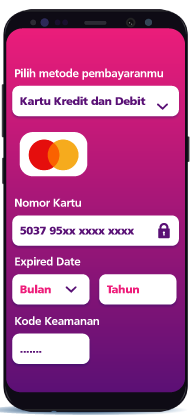
Step 7/10
Enter card number, card validity period, and CVV/CVC number
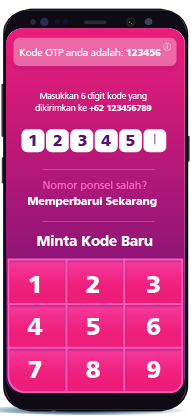
Step 8/10
Enter the OTP code* sent via SMS
*The OTP code is required only for transactions at 3DS merchant. The PIN code is not used inonline debit transaction feature
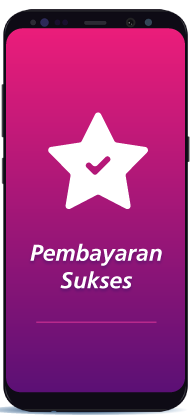
Step 9/10
Transaction successful
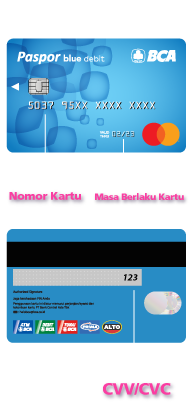
Step 10/10
Get to know the BCA Mastercard Debit Card
Keep the card number, card validity period, CVV/CVC number, and OTP code secret and don't share it to anyone including BCA